


Watch the replay of the webinar, hosted by Camille Penaud, Presales Consultant AMER at EFICAD.
Discover the experience of Francis & Company and see SWOOD in action as it connects design, manufacturing, nesting, and automation within a single parametric environment.
This webinar is about workshop challenges in custom millwork, which must be delivered quickly and without errors.
This reality is perfectly illustrated by Nicholas Tvrdeich, owner of Francis & Company. Focused initially on furniture manufacturing, the company gradually expanded into residential millwork, entry doors, carving, and high-end commercial projects, all with a 5 person team.
Like many custom millwork professionals, they faced too many software tools, limited workflow continuity, and growing complexity as soon as 5 axis machining, curved shapes, or carving became part of their projects.
As Nicholas Tvrdeich explains, “The challenges that we faced before using SWOOD, we had used two to three different software, any kind of carving. Any radius work, bolts, anything that required five-axis work, we couldn’t use the initial software that we bought.”
The turning point came with SOLIDWORKS and SWOOD, which offered one platform, one model, one workflow, from design to machining.
Based on Nicholas Tvrdeich’s experience “The fact that we’re able to take it from the design process directly to the machine is a huge time saver. There’s no in-between software that we have to use to basically streamline the process. In one step, it’s a no-brainer for us.”
Why custom millwork is a strategic challenge
In custom millwork projects, designs evolve, materials change, and shop constraints vary from one machine to another. At the same time, teams need precise, reliable data, from the engineering office to the CNC operator.
In this webinar, Camille Penaud shows concretely how SWOOD, seamlessly integrated into SOLIDWORKS, helps regain control by connecting:
- design,
- manufacturing preparation,
- and data automation
- within a single, coherent, parametric environment.
SWOOD, a reference software for millwork
SWOOD is a CAD/CAM software developed by EFICAD. Certified Gold Product by SOLIDWORKS, the highest level of partner certification, it integrates woodworking-specific features directly into a 3D parametric CAD software widely recognized in the woodworking and millwork industry.
Today, SWOOD is used worldwide for projects in:
- Interior fitting,
- Shop fitting,
- furniture,
- Traditional joinery
- And increasingly for vehicle interiors.

Design without limits
As there are multiple ways to design and deliver a project, it is essential to think about which methodology to use.
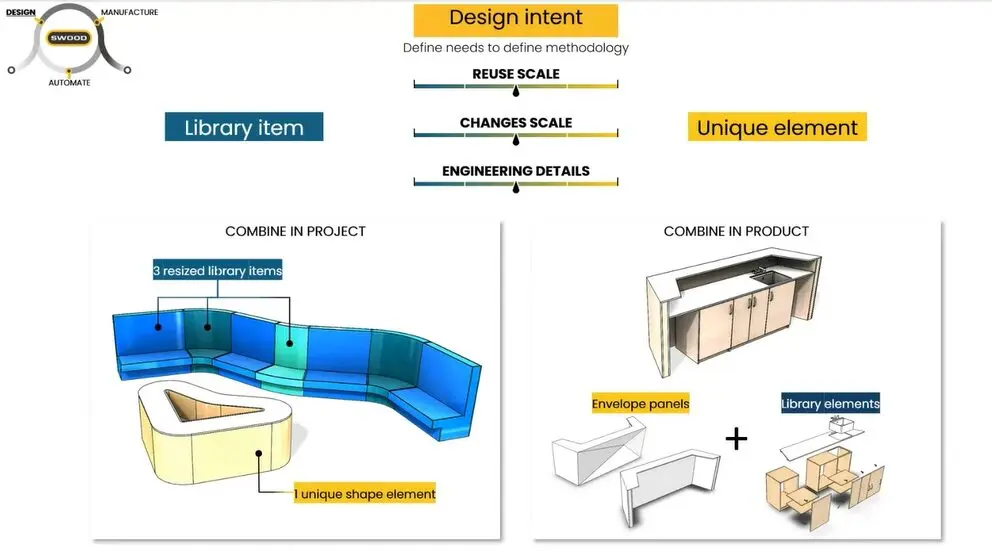
In this webinar, Camille Penaud clearly demonstrates how SWOOD offers two complementary design methodologies that can be used independently or combined, depending on project constraints.

This flexibility enables the management of both large production volumes and highly customized parts, without requiring changes to tools or workflows.
1) The “Library Item” methodology: structured, parametric, ready to use
This approach goes far beyond simply reusing an existing cabinet. It is a flexible design methodology that integrates manufacturing logic from the very beginning of the design phase.
a) Creating a skeleton “the bones”
Design starts with a skeleton, built using 2D and 3D sketches and reference geometry planes, to define the dimensions and overall structure.
b) Inserting panels and “skinning” the structure
Panels are then inserted and linked to this skeleton. As a result, any design change automatically updates the entire model globally.
c) Materials and edge banding via drag-and-drop
In SWOOD, materials carry manufacturing data, such as:
- thickness,
- appearance and texture,
- grain direction, etc.
Edge banding follows the same principle, allowing for changes even at the last minute in the project.
d) Adding connectors
Using its connector library, known as the Library Installer, SWOOD automatically detects interferences and applies joinery details (drilling, positioning, parameters).
This is a key advantage, as all this information is embedded directly in the 3D model, improving part alignment and significantly reducing machining errors.
SWOOD provides cabinets that comply with the leading American standards for architectural woodworking and millwork.
To learn more about AWI standards in SWOOD, read the article: “New: design woodworking projects compliant with international standards“
e) Using smart sub-assemblies with the SWOOD Box
The SWOOD Box works as a smart parametric sub-assembly that can be drag-and-dropped: drawers, grooves, repetitive panel layouts, and more. The goal is to standardize what you already know how to build.
2) The “Unique Element” methodology: full freedom for custom parts
Some millwork elements are unique, such as a reception desk, sculpted wall cladding, or a signature piece.
In these cases, the Unique Element methodology relies on SOLIDWORKS modeling tools, while maintaining parametric design capabilities.
This approach is ideal for parts that will not be reused but still need to remain easy to modify when required.
3) The best approach: hybrid design (Library Item + Unique Element)
As Camille Penaud emphasizes, SWOOD reaches its full potential when both approaches are combined:
– using library items such as cabinets and repeatable assemblies,
– creating unique elements for architectural components and specific shapes.
In real-world millwork projects, a single design method is rarely sufficient.
From design to machining
Once the model is finalized, the project is ready for manufacturing.
At this stage, SWOOD enables nesting, small-part holding strategies, multi-phase machining workflows, and panel flipping.

When necessary, SWOOD Nesting allows you to make manual adjustments.
Moreover, toolpaths, from 3-axis to 5-axis, remain fully linked to the design model, meaning that any modification automatically updates machining strategies.
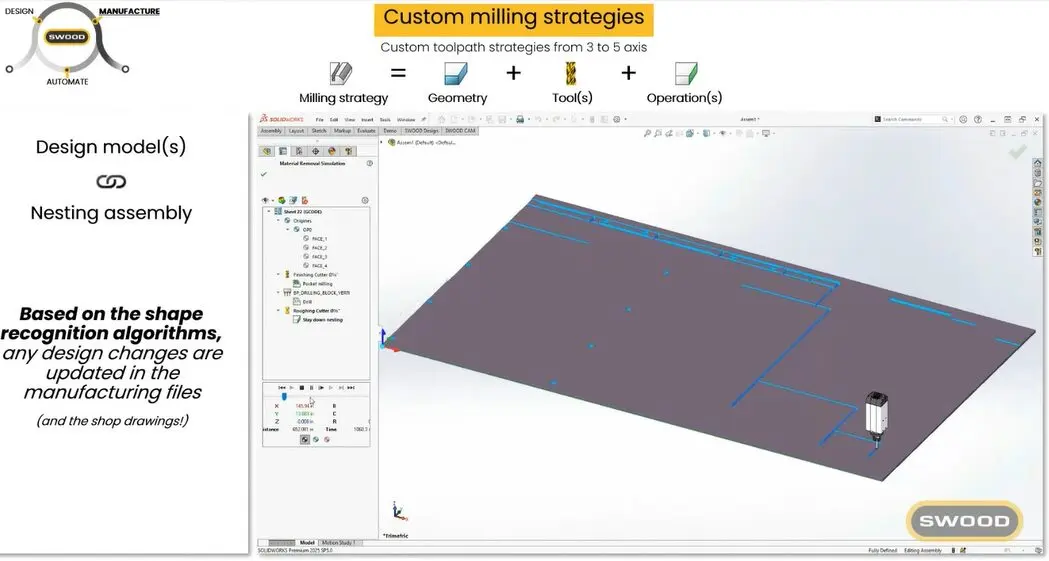
Besides, SWOOD is compatible with all CNC machines on the market (Homag, Biesse, SCM, and many others), thanks to in-house developed post-processors.
Clear reports to share information across teams
Beyond design and manufacturing, SWOOD also simplifies project data generation and sharing through automated reports.
From the 3D model, it is possible to generate design and manufacturing reports including:
- 2D drawings and approval documents,
- bills of materials (panels, hardware, materials),
- material, edge banding, and grain direction information,
- nesting and CNC machining data,
- project cost estimates.

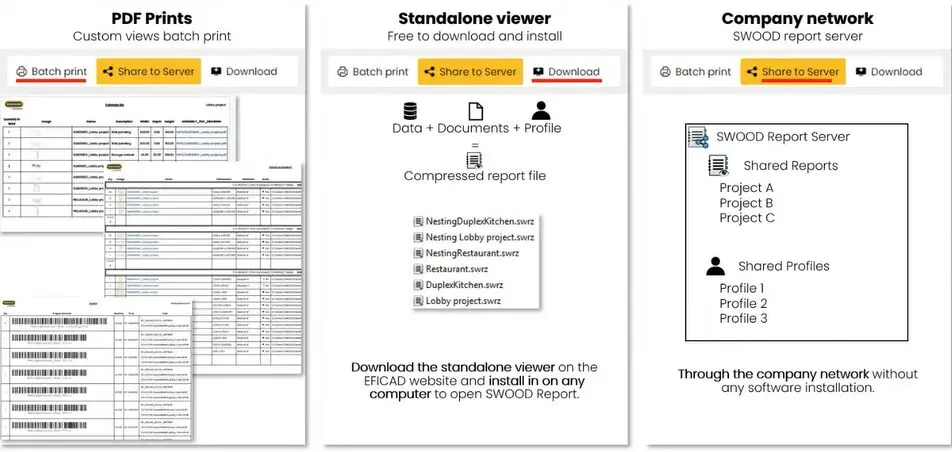
These reports are available through a dedicated viewer, customizable for each department, engineering, workshop, purchasing, or production.
Data can be shared easily as PDF files, via a standalone viewer (free to install), or directly over the company network, ensuring consistent and up-to-date information throughout the project.
Back to the workshop with Francis & Company
For Francis & Company, the impact was immediate:
- fewer software tools to manage,
- faster error detection in 3D,
- better control over machining,
- reliable drawer and hardware machining,
- smooth handling of both high-volume production and custom one-off pieces.
As Nicholas Tvrdeich concludes, SWOOD gives them the flexibility to handle both mass production and highly customized one-off parts, using a single workflow.
SWOOD, a complete solution built for millwork professionals
Through this webinar, Camille Penaud demonstrates how SWOOD and SOLIDWORKS deliver a complete solution:
- flexible design methodologies,
- integrated CAM and nesting,
- 3 axis to 5 axis machining,
- automated project data generation and sharing.


