You know better than anyone that creating cabinets, adding hinges, setting up sliders, and checking drillings takes time, and the slightest mistake can happen quickly.
That’s why SWOOD developed the Library Installer. This smart, ready-to-use library makes designing wood projects (furniture, interior fitting, shopfitting, vehicle interior, and more) faster, easier, and more reliable.
And now, SWOOD provides cabinets that comply with the leading American standards for architectural woodworking and millwork.
Library Installer: a CAD component library designed for woodworking and millwork projects
The Library Installer is a ready-to-use component library available for users of SWOOD, the CAD/CAM software dedicated to woodworking.
It’s constantly updated with the latest references from hardware industry suppliers such as BLUM, HETTICH, GRASS, keeping you up to date with the newest innovations in the industry.
This means you’re working with industrial, up-to-date, and fully tested components.
Everything is already embedded into SWOOD Design to simplify the design of your wood and millwork projects:
- Cabinets, drawers, shelves, handles, hinges, sliders…
- Integrated machining strategies for CAM (production process with point-to-point option or the nesting option)
- Full CNC compatibility thanks to our dedicated post-processors
And now… use the AWI-certified components!
Since June, SWOOD has been an official member of the Architectural Woodwork Institute (AWI).
This American professional trade association develops and maintains national quality and performance standards for the architectural woodworking and millwork industry.
This applies to:
- Interior woodwork: mouldings, baseboards, trims around openings
- Built-in furniture: bookcases, counters, and fixed fittings
- Decorative wood panels
- Stairs, railings, guardrails, and more
What it means for you
From now on, you can:
- Access AWI-certified frames directly from your Library Installer in SWOOD Design
- Streamline and standardize your design and manufacturing processes
- Showcase your craftsmanship by meeting international quality requirements
This membership confirms SWOOD’s commitment to supporting woodworking and millwork professionals in design and production in accordance with AWI standards.
What are AWI standards?
These are the reference standards in the United States for architectural woodworking and millwork, often used as a benchmark in high-end or professional projects.
These standards define the quality, tolerances, finishes, and strength of woodwork.
In fact, they ensure that everything you produce is durable, aesthetically perfect, and meets premium quality standards.
Key concepts include
- Aesthetic Grades: AWI defines three levels of aesthetic requirements for materials, construction, and finishing: Economy, Custom, and Premium, ranging from the most tolerant (Economy) to the most refined (Premium).
- Performance Duty Levels: For structural elements (example: shelves), different load capacities are specified, light commercial, commercial, institutional, or laboratory, depending on the intended use.
- Tolerances: Acceptable variations (example: height differences) are clearly defined, making it possible to evaluate whether an installation meets the expected standards.
- Compatibility & Flexibility: The standards don’t always dictate how an element should be built, but rather set the final performance criteria, such as strength, stability, and appearance.
In practice, how to access AWI standards cabinets in SWOOD?
- Open the SWOOD Library Installer
- Select “Frames”
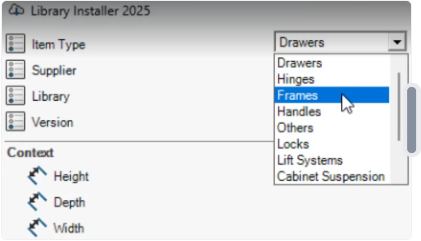
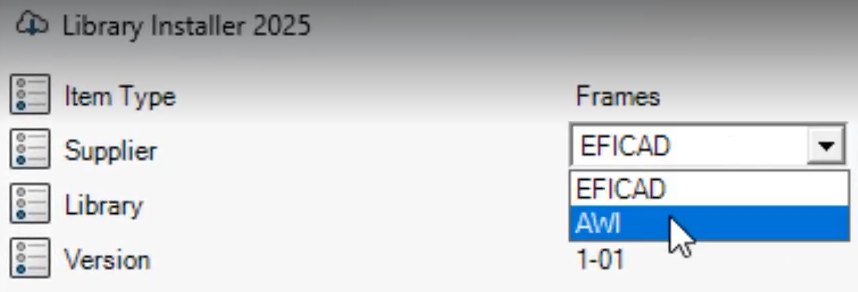
- Then, just switch “EFICAD” to “AWI” in the menu
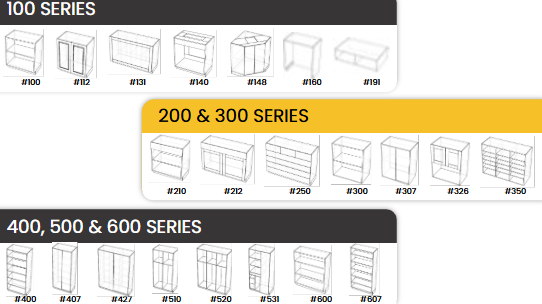
- Access 6 new AWI-certified series with more than 160 cabinets, adding to the 150+ default frames available in SWOOD.
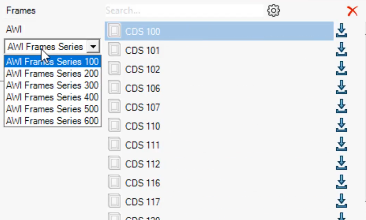
Examples of cabinet design series:.
- With just one click, download and import the SolidWorks assemblies and parts directly into the SWOOD Frames library. To do so, click the download icon.
- Once the download is complete, open the “Frames” folder, then right-click > “Refresh” to update the list of elements. Your cabinets are now instantly ready to use within the SWOOD library interface.
- Next, right-click and select “Edit” to configure each cabinet according to your needs. You’ll have access to over 45 customizable parameters to adjust the sizes, overlays, drilling depths, and much more.
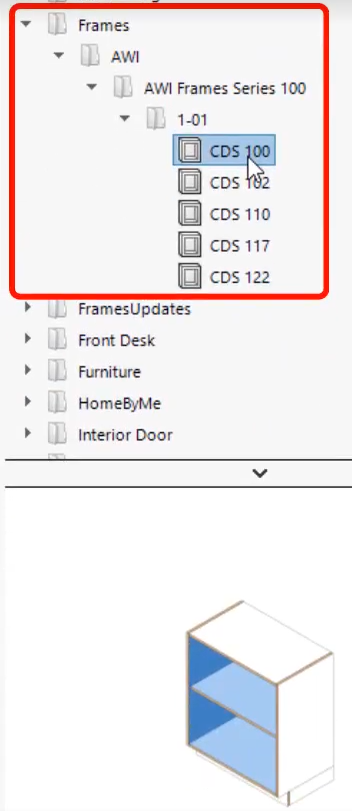
Watch the video to discover how to access the AWI standard cabinet library in SWOOD, click here.
And finally, to find out more about how Library Installer saves you time on your carpentry projects, click here